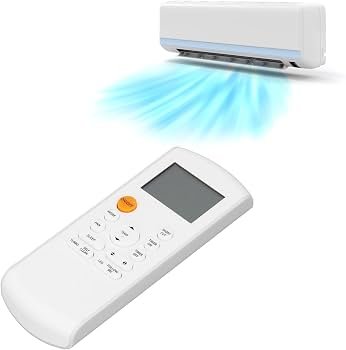
Learning how to use inverter AC remote properly can help you maintain a comfortable room temperature while making better use of your air conditioner’s features. Modern inverter AC remotes provide much more than simple temperature control. They allow you to change operating modes, adjust fan speed, control airflow, activate energy-saving settings, and use advanced functions depending on your AC model.
Popular brands such as Haier, Dawlance, Gree, Kenwood, TCL, Orient, PEL, Midea, Hisense, and Electrolux offer inverter air conditioners with different remote designs. Although button names and advanced features can vary, most AC remotes work in a similar way.
Understanding the Basic AC Remote Buttons
Before using advanced features, it is important to understand the common buttons found on an inverter AC remote.
Power: The Power or ON/OFF button starts and stops the air conditioner.
Temperature (+/-): These buttons increase or decrease the desired room temperature. For everyday cooling, many users prefer setting their AC around 24°C to 26°C, depending on weather conditions and personal comfort.
Mode: The Mode button allows you to switch between different operating modes. Common options include Cool, Heat, Dry, Fan, and Auto. Available modes depend on the AC model.
Fan: The Fan button controls indoor fan speed. Typical options include Low, Medium, High, and Auto.
Swing: This controls the movement of the AC louvers to distribute air around the room.
Understanding these controls is the first step when learning how to use AC remote efficiently.
How to Use Inverter AC Remote for Cooling
To start cooling, press the Power button and then select Cool Mode, which is usually represented by a snowflake symbol.
Next, select your preferred temperature using the temperature buttons. Instead of immediately setting the AC to the lowest possible temperature, choose a comfortable setting and allow the inverter system to regulate its operation.
You can then select Auto fan speed or manually choose the desired fan setting. Activate Swing if you want the cool air to circulate across a larger area of the room.
This basic process applies to most inverter ACs, although the exact symbols and button locations may differ between manufacturers.
Important Modes on an Inverter AC Remote
Modern inverter ACs generally offer several operating modes.
Cool Mode
Cool Mode is designed for normal air conditioning during hot weather. The compressor works to bring the room toward your selected temperature.
Dry Mode
Dry Mode helps reduce excess moisture in the air. It can be useful during humid weather when the room feels uncomfortable even if the temperature is not extremely high.
Fan Mode
In Fan Mode, the indoor fan circulates air without providing normal compressor-based cooling. It can be useful when you only need airflow.
Heat Mode
Heat Mode is available on heat-and-cool inverter AC models. It reverses the air conditioning cycle to provide warm air during colder months.
Auto Mode
Auto Mode allows compatible AC models to automatically manage operation according to room conditions and the selected temperature.
Using Timer, Sleep, Turbo and Eco Features
Once you understand how to use inverter AC remote, you can start taking advantage of additional functions.
The Timer function lets you schedule when the AC turns on or off. This can be useful at night or when you want the room cooled before a particular time.
Sleep Mode is designed for nighttime comfort and may gradually adjust operation depending on the model.
Turbo Mode provides powerful cooling when you want the room temperature to change quickly. Since operation varies by manufacturer, check your AC manual for the exact behavior.
Some models also include an Eco or Energy Saving Mode designed to reduce unnecessary power consumption while maintaining comfort.
What Is DC in AC Remote?
People sometimes search what is DC in AC remote after seeing DC-related terminology associated with their air conditioner. In most cases, DC refers to Direct Current technology used in inverter components or motors rather than a universal remote-control mode. The exact meaning of any DC indicator can vary by brand and model, so the product manual should be checked for confirmation.
Remote Features Can Differ by AC Brand
While the basic functions are similar, manufacturers often include their own features and terminology.
Brands such as Gree, Haier, Dawlance, Kenwood, TCL, Orient, PEL, Midea, Hisense, and Electrolux may provide features such as intelligent temperature sensing, Wi-Fi control, self-cleaning, energy monitoring, low-voltage operation, or customized airflow on selected models.
Always check the remote supplied with your specific AC because not every feature is available on every model.
Tips for Using Your Inverter AC Remote Efficiently
Keep the remote pointed toward the indoor unit when changing settings and make sure there are no major obstacles between the remote and AC receiver. Replace weak batteries if the remote becomes unresponsive.
For efficient everyday operation, select a comfortable temperature instead of constantly changing settings. Keep doors and windows closed while cooling, clean the AC filters regularly, and use Timer or Sleep functions when appropriate.
If you are comparing inverter air conditioners from leading brands, Gulf Electronics offers a range of AC options suitable for different room sizes, features, and budgets.
Final Thoughts
Knowing how to use inverter AC remote makes it easier to get the desired comfort from your air conditioner. Start by understanding Power, Mode, Temperature, Fan, and Swing controls, then explore functions such as Timer, Sleep, Turbo, and Eco according to your specific model.
Since remote layouts and advanced functions vary between brands and AC models, always refer to the manufacturer’s manual when a symbol or setting is unclear.